What is Private Browsing?
Private browsing is a feature that allows users to browse through the Internet without leaving any information. If you do not want your browsing history and cookies to be saved, then anonymous browsing is the solution for you.
Anonymous web browsing is also suitable for users who wish to keep their Internet activities away from nosy work colleagues. Before we share some tips on private browsing, you should understand that it is not 100% effective. It does not protect your sensitive data from spyware, viruses, or your Internet Service Provider (ISP) from tracking the pages that you visited, but it does allow you to keep your private information hidden from other users who share the same computer.
Why we need Private Browsing?
So why do we need to browse privately or anonymously? It is because browser will keep a copy of cookies or session and hackers are able to utilize these cookies to login to our account even though without the password.
Take Facebook as an example. If you login your Facebook account at a public computer, and leave the pc without logging off your account, then anyone who know how to copy the cookies from computer is able to “hijack” your Facebook account. But if you turn on Private Browsing on the browser, you are safe as the browser will not save any cookies or history on that computer.
So, it is encouraged to use Private Browsing when you surf on public computers.
For Google Chrome users, the Chrome private browsing feature can be executed by opening the Settings menu, and selecting “New incognito window”. Alternatively, you could also press Ctrl+Shift+N on your keyboard.

A new window will pop up. The small detective logo at the top left lets you know that you’ve gone incognito.
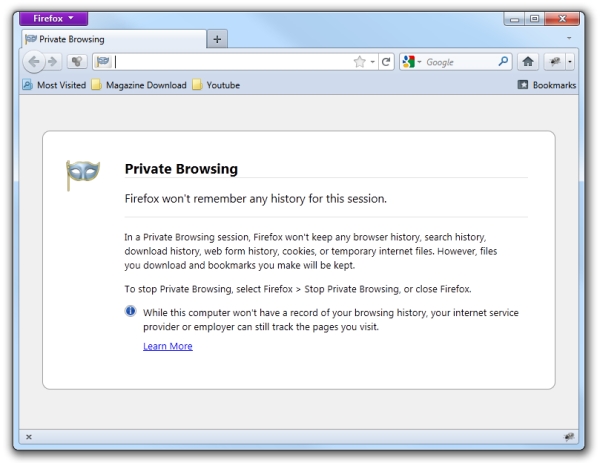
If you are using Firefox, you can turn on the private browsing feature by clicking the top-left “Firefox” button and select “Start Private browsing”.
Another method of anonymous browsing is using Virtual Private Network (VPN) software like Cyberghost. Cyberghost exchanges the visible IP address that you use to connect to the Internet with its own VPN IP address. The program utilizes 1024-bit SSL encryption and a 128-bit AES key for each connection. However, we need to remind you that the free edition of Cyberghost only operates up to six hours at a time. The program will need to be re-launched if you want to continue your private browsing.

Installing proxy browser software – such as Tor – also allows for anonymous browsing. It defends against network surveillance activities that could threaten confidential business activities. The Tor Browser Bundle is free to use on Microsoft Windows, Apple OS, and Linux.

Do you use any of the above to browse the internet anonymously ?

12 comments
I have not used CyberGhost before, but it looks pretty good. Thanks, will be great when I need to browse anonymously next time!
Its really very impressive and use full, at least now i am tension free for getting caught by my brother about what i do in browser.
I’ve read an article a week ago telling people that Facebook, Twitter and G+ are storing your info even when you’re logged out. They use .htaccess and manipulate those to track you (even when you’re not logged in) so when you share, tweet and + they can logged you in (even if your logging in again). Too bad I didn’t save the article, it’ll be help though.
Really awesome , not many people know about these features. Private Browsing can be very useful to work from cafes and different PCs
the Tor software is usually used for pretty dodgy activities. But is does work…
helende reis
Really comes in handy when your company OWA stays logged in infinetly EVEN if you click log out! I have reported this twice to the admin, and they really dont care.
I always saw this feature in my Firefox but did not knew what it actually is.It is very useful feature though.Now I will start using it.
This is very informative blogs. Private Browsing aims to help you make sure that your web browsing activities don’t leave any trace on your own computer. Private Browsing is only about making sure that Firefox doesn’t store any data which can be used to trace your online activities, no more, no less.
Private browsing is going to be great for the next few months, I can’t have my wife knowing what she’s getting for Christmas!
Private browsing in Firefox is cool and helps to maintain privacy. Cyber Ghost seems to be a nice product will try it soon.
I have tried TOR, yes it is effective but the browser is a bit slower. There are lots of free anonymous surfing software today that are more faster.
Really an interesting information about anonymous internet browsing for a normal user. The above mentioned tools are simple and free tools available over the network for safe browsing.