I’ve been a keen reviewer of some of the top SEO tools and SEO related software in the market, this way I can assist you to make an informed decision about your SEO requirements.

I recently got my hands on Rank Tracker, it’s an SEO software from the Link-Assistant.com team of professionals. As the name suggests Rank Tracker is a SEO Tool that helps check ranking of your website across search engines.
If you have a web business, you know the importance and benefits of ranking, I agree that checking your rank on search engines is a very operational procedure, but it’s a very effective way of giving you direction for your SEO efforts.
To drive the right audience and be profitable you want to rank high for keywords that impact your business and products, and Rank Tracker does the job perfectly.
Key Benefits of Rank Tracker:
1 ) Easy to install: Rank Tracker is a wizard-like software that is very easy to install and use, when you download the software it asks you for your details and based on the information you provide it gives you the desired output.
2 ) Speed: Rank Tracker is amazingly fast (it’s one of the fastest rank checking tools I’ve experienced), I can run a check for more than 100 keywords in Google, Bing and Yahoo search in less than a minute.
3 ) Accurate: Let me be honest here, a lot of SEO tools available on the market are not accurate, you may see your search ranking high for a particular keyword on Google but when you actually check the results on search engines it’s inaccurate. Rank Tracker will throw results that are very accurate across different data centers.
4 ) Frequent updates: Rank Tracker has more than 600 search engines in their database, the database is frequently updated with new search engines across various countries.
5 ) Best keywords: Rank Tracker shows you the best keywords that you can use to optimize your site, it shows you how many times a keyword has been actually searched by real people over the last month along with the competition for the keyword or the KEI (Keyword Efficiency Index)
How to check your rankings across Search Engines on Rank Tracker
Step 1 : Once you download and install the Rank Tracker software the next step is to type in your site or blog URL.

Step 2: Select the search engines you want to track rankings on. Besides the standard search engines, Google, Bing, Yahoo Rank Tracker supports more than 600 search engines; you can check the entire list here
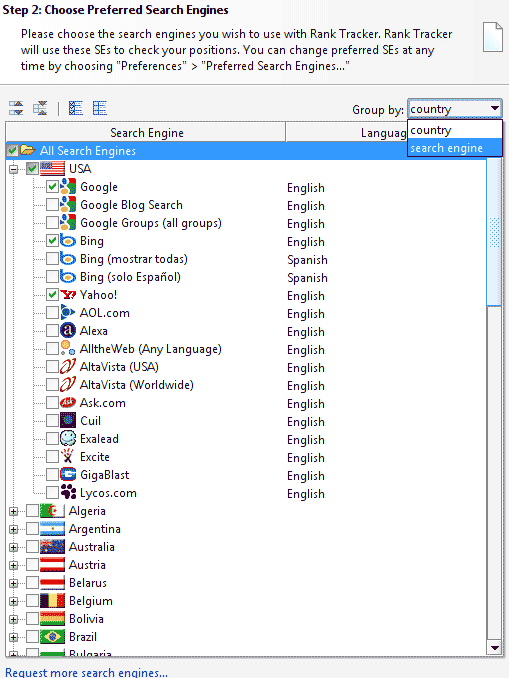
Step 3 : Once you have selected the search engines you can specify your keywords and keyword phrases that you wish to monitor and click on Finish

The software does the job very well in a matter of a few seconds to show you the ranking of your key phrases across search engines.
Rank Tracker Pricing:
You can test drive Rank Tracker for free by downloading the FREE Trial version, you can also buy the Rank Tracker Professional license for only $ 99.75. It’s best suited if you have rank tracking responsibility for your company or client rankings. It’s an advanced tracking software that offers speed, accuracy and reporting for a nominal fee of $99.
Check out Rank Tracker

8 comments
Yeah this is one amazing piece of software. I couldnt live without it, only problem is, its so addictive. I use the scheduler to run my ranking reports once a day and then e-mail them automaticlly to my clients on a weekly basis. BTW its accurate too.
.-= Dave Simpson´s last blog ..What Is Social Media Optimisation? =-.
Thanks Dave for the testimonial 🙂
I recently read that search engines frown on these types of tools. Do you know if there is any truth to that theory?
Nice review, was very helpful and informative. I’ve heard of them before but really didn’t know how it could help me. I will download the FREE trial first and see how I like it.
.-= Mathew Day´s last blog ..8 Plugins to Transform Wordpress into an Ecommerce Store =-.
I use seo book’s rank checker tool, it’s similar to this tool. I’ll try this free version.
This one is cool. I will check it out. Thanks for sharing.
this is an awesome tool. I would be way more busy with out it.
I just got this software a few weeks ago. It’s awesome. I use it everyday to check on my website.
Comments are closed.